
- Up to 600%
- 15-min payouts
- Licensed
558H app and APK — install it properly, or skip it entirely
An APK is an app installed outside any store, which means no review process and no automatic updates. That is not automatically dangerous, but it does put the entire burden of verifying the source on you. This guide covers whether you need the app at all, how to install one without leaving your phone exposed, and the four errors that account for most failed installs.
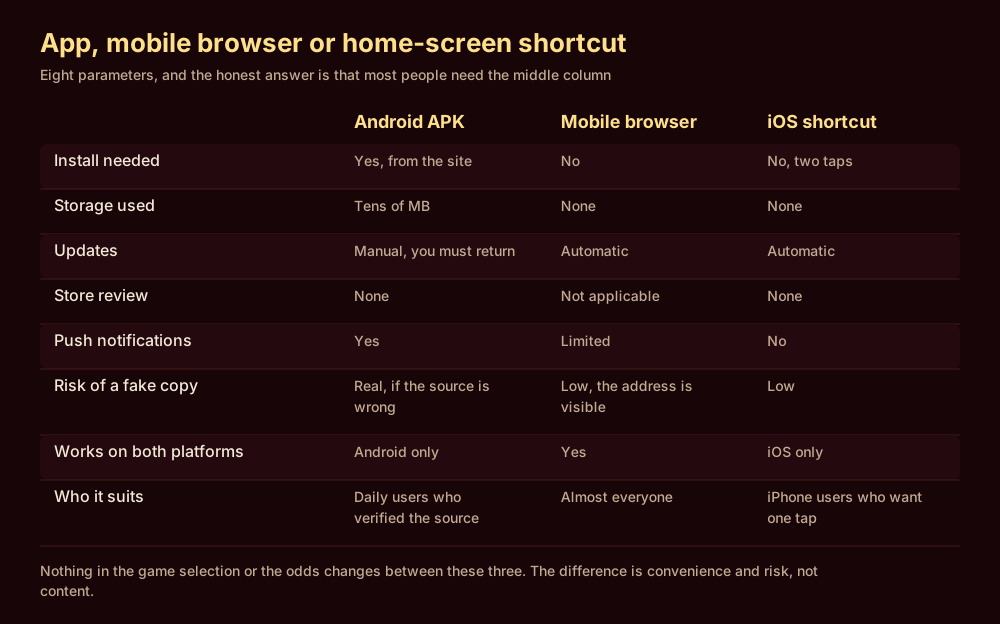
Do you actually need the app?
Casino and betting apps are not distributed through Google Play or the App Store in most markets, because both stores restrict real-money gambling apps to jurisdictions where the operator holds a recognised licence. That is why every operator serving Bangladesh offers an APK download from its own site rather than a store listing.
The consequence is worth stating plainly: an APK receives no store review, no malware scan and no automatic updates. The file is exactly as trustworthy as the place you got it from, and no more.
There is no iOS app. What is offered instead is a home-screen shortcut to the mobile site, added through the browser share menu. It is a bookmark with an icon — which is fine, and is not the same thing as an app.
Installing an APK without leaving your phone open
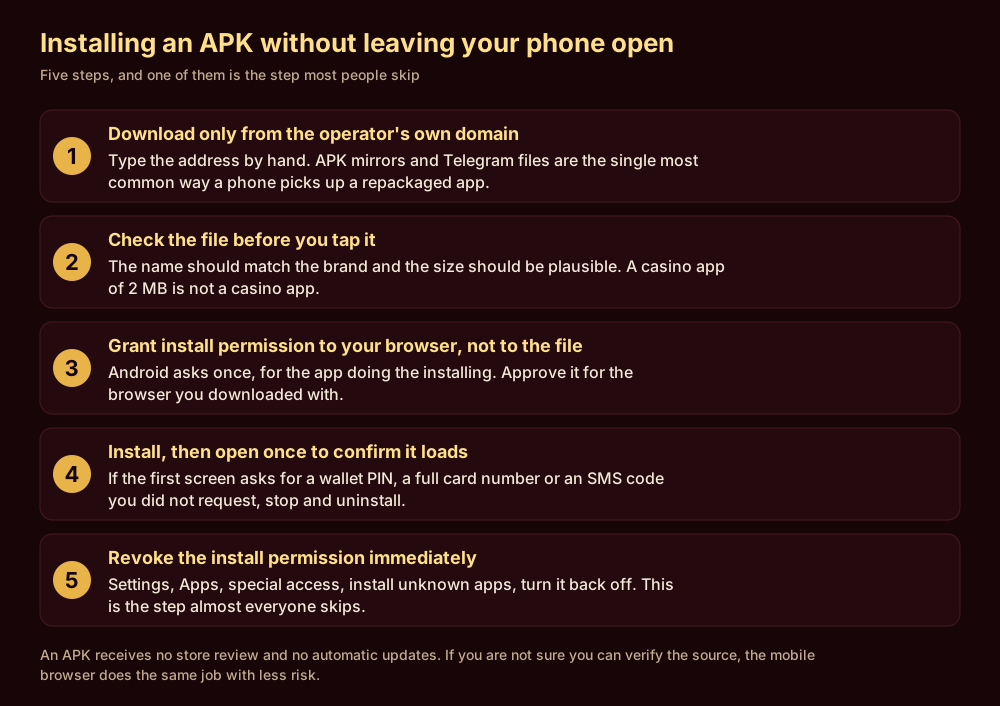
- 1Type the operator's domain by hand. Not a link from a Telegram group, an SMS, an ad or a search result you did not read carefully. APK mirror sites are the most common source of repackaged gambling apps, and a repackaged app looks identical to the real one.
- 2Check the file before you tap it. The filename should match the brand and the size should be plausible for a casino client — tens of megabytes. A 2 MB file is not a casino app; it is a downloader for something else.
- 3Grant install permission to your browser. Android asks for permission for the app doing the installing, not for the file. Approve it for the browser you downloaded with, and only that one.
- 4Open it once and check the first screen. A login screen asking for a wallet PIN, a full card number, or an SMS code you did not request is not a login screen. Uninstall and stop.
- 5Revoke the install permission immediately. Settings → Apps → Special access → Install unknown apps → turn it off for that browser. This is the step almost everyone skips, and it is a thirty-second job.
The four errors that account for most failed installs
| What you see | What it usually means | What to do |
|---|---|---|
| “App not installed” | An older version of the same app is present, or the file downloaded incompletely | Uninstall the old version first, then re-download over a stable connection |
| “Installation blocked” | Install permission has not been granted to the browser doing the install | Grant it for that specific app, then revoke it after |
| “There was a problem parsing the package” | The file is corrupt, truncated, or built for a different Android version | Re-download. If it repeats, the source is the problem — check the minimum Android version on the download page |
| Installs, then will not open | Architecture mismatch, or the download was a repackaged file | Uninstall it. Do not troubleshoot an app you cannot verify the origin of |
System requirements, current app version and file size for 558H: an Android APK in this segment is normally 30–80 MB and needs Android 5.0 or newer; there is usually no iOS app, only a browser shortcut — that is what this market typically offers, not a figure taken from 558H; confirm the exact terms on the operator's own page before you deposit
Keeping the app safe after it is installed
Three habits, none of which take more than a minute.
- Update from inside the app or from the site, never from a link someone sends you. An APK does not auto-update, so at some point you will be prompted to install a new version. That prompt is the moment a fake update reaches people.
- Do not use the same password anywhere else. A gambling account holds a payment method and a verified identity document. It deserves a unique password more than most accounts do.
- Turn off biometric unlock if the phone is shared. Convenience on a shared device means anyone holding it has an account with your money in it.
If you ever cannot remember where a version came from, uninstall it and start again from the operator’s domain. Reinstalling costs five minutes; the alternative costs whatever is in the account.
Frequently asked questions
Is the 558H APK safe to install?
The file is exactly as safe as its source. Downloaded from the operator's own domain and installed with the permission revoked afterwards, the risk is low. Downloaded from an APK mirror or a messenger link, it is unverifiable — and repackaged gambling apps are common enough that this is not a theoretical concern.
Why is the app not on Google Play?
Google Play restricts real-money gambling apps to countries where the operator holds a recognised licence, and Bangladesh has no domestic licensing regime for online casinos. Distribution through the operator's own site is the standard workaround, not a warning sign in itself.
Is there an iOS app?
No. iPhone users add a home-screen shortcut to the mobile site through the browser's share menu. It behaves like an app icon and loads the same site, with automatic updates and a visible address.
Does the app offer different games or odds than the site?
No. Both connect to the same account and the same platform. Occasional app-only promotions exist, but the game library and the prices are the same.
How do I uninstall it cleanly?
Long-press the icon and uninstall as you would any app, then check Settings → Apps → Special access → Install unknown apps and confirm the permission is off. Uninstalling the app does not revoke that permission.